
Building an ESL curriculum involves much more than generating lesson plans. You need a clear progression, measurable objectives, balanced skills practice, reusable materials, and assessments that show whether students are improving.
Free AI tools can make that work faster, but they should not decide what your students need. The teacher still sets the goals, chooses the sequence, and checks every activity.
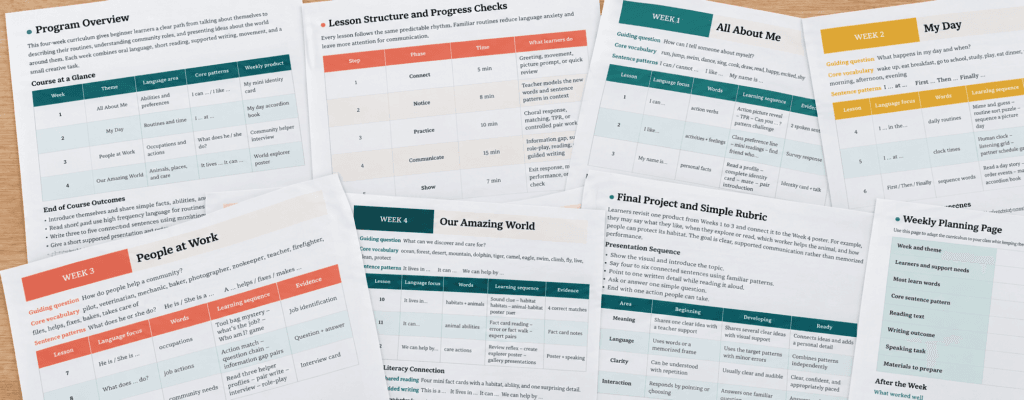
The most practical approach is not to generate a full 36-week course in one prompt. Build and test one four-week unit first. Once the structure works in your classroom, reuse it for the rest of the course.
The Free Curriculum-Building Toolkit
| Curriculum task | Tool | Best use |
|---|---|---|
| Course structure and first drafts | ChatGPT | Scope and sequence, objectives, activity ideas, and revisions |
| Lesson plans and assessments | MagicSchool | Structured teacher tools for planning, rubrics, and quizzes |
| Reading differentiation | Diffit | Adapting texts and creating editable supporting activities |
| Storage and organization | Google Drive and Docs | Keeping the curriculum editable and organized |
All three AI platforms currently offer free access, although limits and included features may change. Check each tool’s current plan before committing to a long project. Diffit Basic currently provides access to content created within the last 90 days, so export important resources and keep the working curriculum in your own storage. You do not need every available AI tool; a small, consistent toolkit is easier to manage. For a wider comparison of no-cost options, see our guide to free AI tools for ESL teachers.
Step 1: Define the Course Before Using AI
Before opening a tool, write down five decisions:
- Who are the learners?
- What is their approximate CEFR level?
- How many weeks and class hours are available?
- What do they need English for?
- What should they be able to do by the end?
Make the final question concrete. “Improve speaking” is too broad. “Give a two-minute description of a past experience and answer follow-up questions” is assessable.
These decisions become your curriculum brief. AI output becomes much more useful when the brief is specific. For help turning a CEFR level into lesson-level objectives, see our guide to CEFR-aligned lesson plans with AI.
Step 2: Create a Scope and Sequence
Use ChatGPT to draft the course map. Ask for communicative outcomes rather than a list of disconnected grammar points.
Review the result before continuing. Check whether the language load is realistic, skills are balanced, and each week builds toward the final outcome. Remove anything your students do not need.
AI often tries to cover too much. A smaller curriculum taught well is better than a crowded curriculum that students cannot absorb.
Step 3: Design the Unit Assessment Early
Decide how learners will demonstrate the final outcome before creating daily activities. This keeps the lessons connected.
For the example above, the unit assessment might include:
- a short reading about a community service;
- a listening task based on a simple conversation;
- a role-play asking for information;
- a short written message about a local need.
MagicSchool’s free plan includes core teacher tools for lesson planning and assessment. You can also use ChatGPT with a focused prompt:
Do not accept an AI-generated test without checking it. Make sure the questions measure the stated outcomes and that there is only one defensible answer where an answer key is provided.
Step 4: Build One Repeatable Lesson Pattern
Instead of generating eight unrelated lesson plans, create a lesson structure you can reuse. For a 60-minute class, one possible pattern is:
| Stage | Time | Purpose |
|---|---|---|
| Review and warm-up | 8 minutes | Retrieve previously learned language |
| Input | 12 minutes | Hear or read the target language in context |
| Guided practice | 15 minutes | Practice with support |
| Communicative task | 20 minutes | Use English to exchange real information |
| Exit check | 5 minutes | Show what was learned |
Use ChatGPT or MagicSchool to fill this structure for each lesson. Keep the same lesson objective, target language, and assessment criteria in every prompt so the materials remain aligned.
Step 5: Create and Differentiate Materials
ChatGPT can draft dialogues, role-play cards, short writing models, and comprehension questions. Diffit is especially useful when you already have a text and need a more accessible version or editable supporting materials. For a step-by-step walkthrough, see our guide to using Diffit for mixed-level ESL classes.
For a mixed-level class, keep the topic and learning goal the same while changing the amount of support. For example:
- emerging learners receive a shorter text, picture support, and sentence frames;
- on-level learners receive the core text and questions;
- stronger learners receive the original text and an extension task.
Differentiation should not turn into three separate curricula. Students can work with different levels of support and still participate in the same final discussion or task.
For listening, do not treat text-to-speech as a complete listening curriculum. Learners need a clear audio model before responding, and the recording should match the accent, speed, and purpose of the lesson. If AI creates the script, the teacher should listen to the final audio and check pronunciation, pauses, and naturalness before class.
Step 6: Run a Teacher Quality Check
Before adding any AI-generated material to the curriculum, check:
- Is the language appropriate for the learners’ actual level?
- Does the activity practice the stated objective?
- Are the examples natural and culturally appropriate?
- Are instructions clear enough for students to follow?
- Is the answer key accurate?
- Does the lesson include meaningful student language use?
- Have names and personal student information been removed from prompts?
This review is part of curriculum design, not an optional final step.
Step 7: Teach the Four-Week Unit Before Expanding
After each lesson, record three short notes: what worked, what took too long, and what students still could not do. Revise the unit based on classroom evidence.
Only then should you ask AI to extend the pattern:
This produces a more coherent curriculum than generating an entire year at once. Repeat the process unit by unit, keeping all plans, materials, assessments, and revision notes in clearly labeled Google Drive folders.
What Free AI Can and Cannot Do
Free AI can reduce drafting time and help a solo teacher produce consistent materials. It can also make revisions and differentiation much faster.
It cannot reliably diagnose your class, guarantee CEFR alignment, choose an appropriate pace, or know whether an activity worked. Free plans may also have usage limits, so save completed work outside the AI platform and avoid building a workflow that depends on one feature remaining free forever.
Final Recommendation
Start with one level, one learner group, and one four-week unit. Use ChatGPT for the course map and drafts, MagicSchool for structured planning and assessment support, and Diffit when texts need adaptation. Then teach, observe, revise, and expand.
The goal is not an AI-generated curriculum. It is a teacher-designed curriculum built more efficiently with AI.