
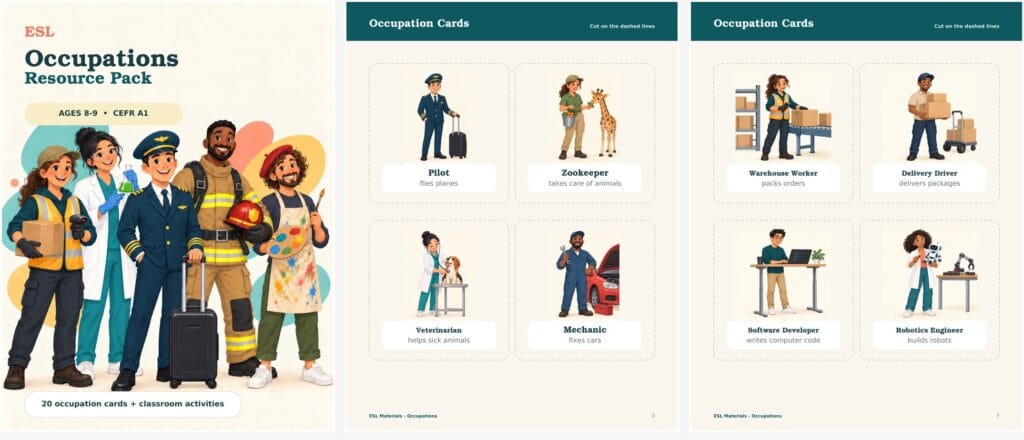
An occupations lesson often begins with a list of job words. But vocabulary alone does not give students enough practice to use the language.
A more useful resource connects the words to clear pictures, simple descriptions, questions, speaking activities, and short reading practice. That is what I wanted to create with this ESL occupations resource pack for young A1 learners.
The finished pack includes 20 occupation cards and classroom activities for learners ages 8–9. You can download the complete PDF below or follow the design process to create a similar resource for your own class.
Download the Free ESL Occupations Resource Pack
What Is Included in the Resource Pack?
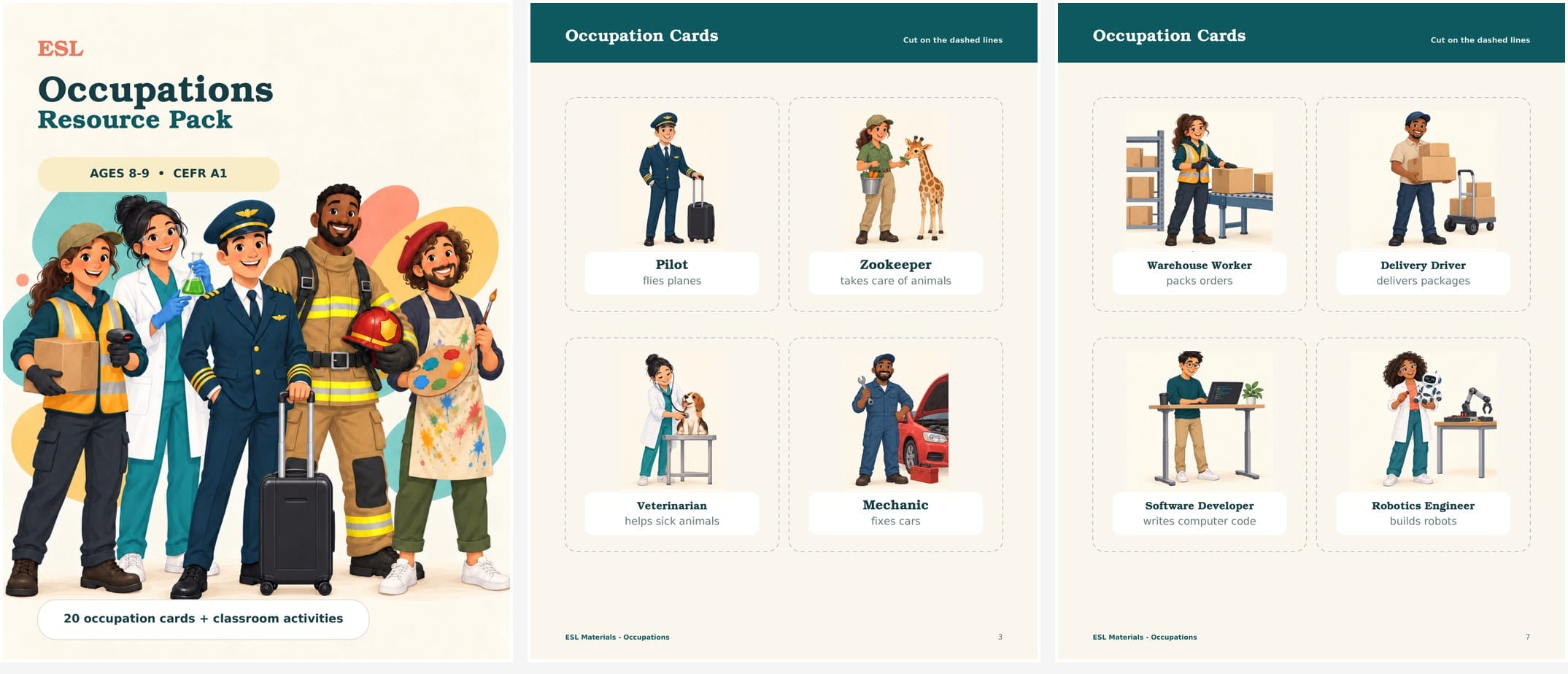
The pack is designed as a small teaching sequence rather than a collection of unrelated worksheets. It includes:
- 20 illustrated occupation cards
- simple job descriptions such as flies planes and helps sick animals
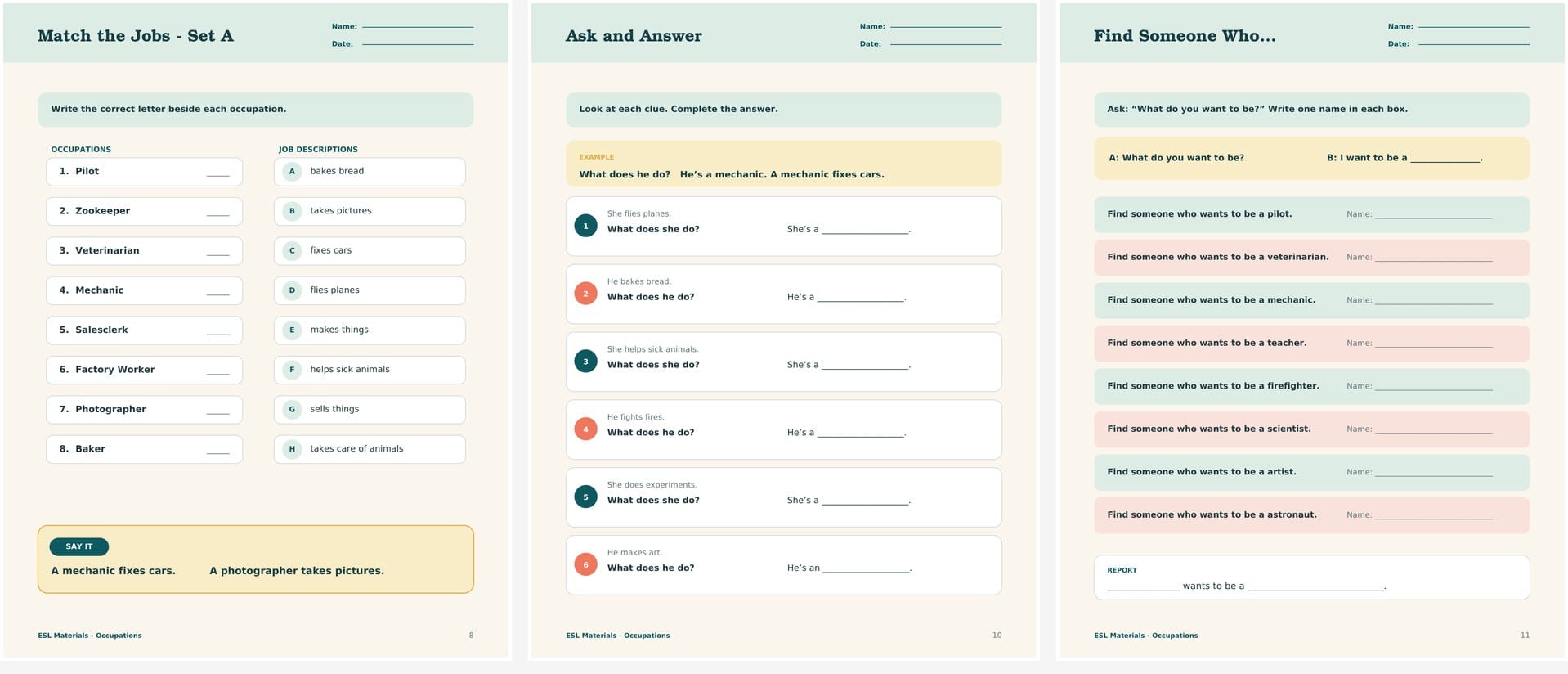
- two job-and-description matching worksheets
- an ask-and-answer activity using What does he/she do?
- a Find Someone Who speaking activity
- a short Career Day reading passage
- comprehension questions and an answer key
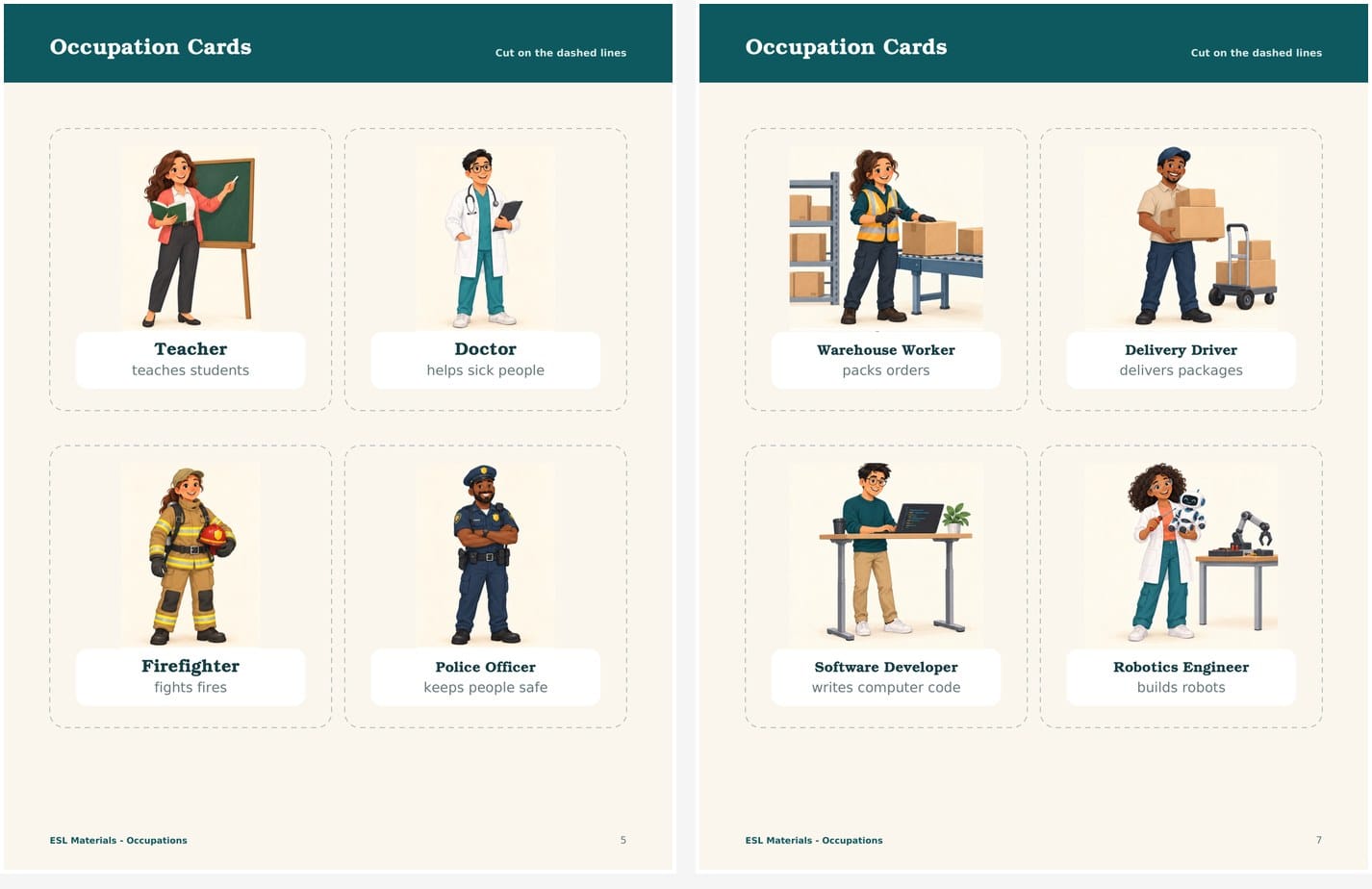
The first 16 cards cover familiar occupations such as pilot, veterinarian, mechanic, baker, teacher, doctor, scientist, and artist. Four additional cards introduce jobs that children increasingly see in the world around them: warehouse worker, delivery driver, software developer, and robotics engineer.
This broader selection keeps the resource from feeling like a copy of a traditional coursebook unit.
Step 1: Start with the Language Students Need
Before opening an AI tool, decide what students should be able to say by the end of the lesson.
For this pack, the target language is intentionally limited:
- What does he/she do?
- He’s/She’s a __.
- A pilot flies planes.
- What do you want to be?
- I want to be a __.
This decision controls everything that follows. The card descriptions, matching tasks, speaking activity, reading passage, and answer key all recycle the same language.
Without this step, AI tends to generate too many grammar patterns, overly difficult definitions, or activities that do not connect to one another.
Step 2: Build a Balanced Vocabulary List
I began with familiar jobs that are appropriate for A1 learners, then added a small number of contemporary occupations.
The goal was not to include every possible job. Twenty cards are already more than students should learn in one lesson. The Teacher Guide recommends choosing six to eight cards at a time and introducing only three or four at the beginning.
When creating your own list, check three things:
- Can students understand the job through one clear image?
- Can the job be explained with a short A1-level phrase?
- Does the full set represent more than one type of work?
For example, robotics engineer is a longer phrase, but the image of a person building a robot makes it understandable. The description builds robots is also short enough for young learners to remember.
Step 3: Ask AI for Consistent Content, Not a Finished Pack
AI is useful for generating a first draft of vocabulary, descriptions, questions, and activity ideas. It is less reliable when asked to create an entire classroom resource in one prompt.
A better approach is to work in small stages. For example:
Create a list of 20 occupations for 8–9-year-old CEFR A1 English learners. Include familiar and contemporary jobs. Give each occupation one description using a simple present verb phrase of no more than five words.
Then review every result as a teacher.
Some descriptions may be technically correct but too abstract. Others may introduce vocabulary that is harder than the occupation itself. In this pack, each description needed to be short, concrete, and reusable in a sentence:
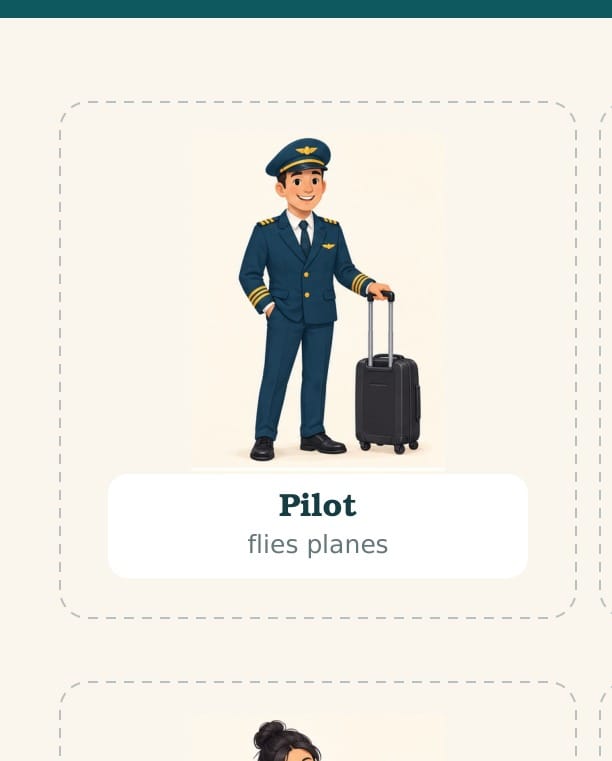
- pilot — flies planes
- veterinarian — helps sick animals
- photographer — takes pictures
- warehouse worker — packs orders
- software developer — writes computer code
The teacher’s role is to set the language limit and reject anything that does not fit it.
Step 4: Create Illustrations That Teach the Meaning
The illustrations are not decoration. Each one needs to help students understand the job before they read the description.
That means the person should be shown doing the work or holding an object strongly associated with it. A veterinarian examining an animal is clearer than a person simply wearing a white coat. A warehouse worker standing beside boxes and a conveyor belt is more useful than a generic worker in a safety vest.
Consistency also matters. For this pack, the illustrations use the same friendly editorial style, similar character proportions, light backgrounds, and clear full-body poses.
AI-generated images still require close inspection. Check:
- hands holding tools or objects
- the direction and perspective of equipment
- missing or duplicated fingers
- uniforms and safety equipment
- objects that are cropped or visually confusing
- whether the character’s action matches the job
One small visual error can make an otherwise polished teaching card feel unreliable.
Step 5: Turn the Cards into a Learning Sequence
Once the vocabulary cards are ready, the next task is not to generate random worksheets. Each activity should add one manageable layer of language.
1. Recognize the Words
Show three or four cards. Say each word, have students repeat it, and keep the cards visible.
2. Match Jobs and Descriptions
Students connect mechanic with fixes cars or baker with bakes bread. This checks meaning without requiring a full sentence yet.
3. Ask and Answer
Students move from recognition to production:
What does he do?
He’s a mechanic. A mechanic fixes cars.
4. Personalize the Language
The Find Someone Who activity introduces:
What do you want to be?
I want to be a scientist.
5. Read the Language in Context
The Career Day passage brings several occupations together in a short story. Because students have already practised the words and sentence patterns, the reading feels achievable rather than disconnected from the lesson.
This sequence is what turns a set of attractive cards into a usable classroom resource.
Step 6: Design for Printing and Classroom Use
Printable materials need a different kind of design from blog graphics or social media posts.
For the occupation cards, the job title and description are grouped in one white panel. The title is larger and darker, while the description is slightly lighter. Dashed cut lines are visible but do not compete with the illustrations.
The worksheets use:
- a consistent page header
- large activity titles
- clear instructions near the top
- enough writing space for young learners
- repeated spacing and box styles
- light backgrounds that do not use excessive printer ink
Small details matter. Text should be vertically centered inside boxes. Top and bottom padding should feel equal. Name and date lines must provide enough room to write. Instructions should be visible without becoming the strongest element on the page.
Step 7: Test the Pack as a Teacher
Before publishing a resource, read it as if you were about to teach with it.
Ask:
- Can I explain the lesson flow quickly?
- Are any words unnecessarily difficult?
- Do the questions match the pictures?
- Is there enough support for students who need it?
- Can I use only part of the pack without confusing students?
- Are the answers complete and accurate?
For this resource, the final check also included page numbering, cutting space, card-label placement, worksheet writing areas, and balanced margins inside every box.
How to Use the Free Pack
You do not need to teach all 20 occupations at once.
For one 40–50 minute lesson, choose six to eight cards. Introduce three or four first, then add the remaining words after students are comfortable. Use the matching worksheet for meaning, the question activity for controlled speaking, and the Career Day passage for review.
The four contemporary occupations can be added later as an extension or used with students who already know common job words.
Download the Free ESL Occupations Resource Pack
The PDF is free for use in your own classroom. Please do not republish, upload, or sell the file.
Final Thoughts
AI can speed up the early stages of creating ESL materials, especially when you need vocabulary ideas, short descriptions, activity variations, or illustration drafts. But the quality of the final resource still depends on teacher decisions.
The most important work is choosing an appropriate language target, limiting the difficulty, checking every visual, and connecting the activities into a sequence students can follow.
If you want to create your own resource series, begin with one topic and one clear language outcome. A smaller, coherent pack is more useful than a large collection of disconnected AI-generated pages.
For the broader design process, read How to Create Effective ESL Teaching Materials with AI.